AirStereo
Designed for MacBook Air M2 / M3 / M4 / M5.
Makes your MacBook Air sound like it should.
System-wide stereo widening & bass boost. Makes your built-in speakers sound wider, richer, and more immersive.
macOS 12+ · Free · Lightweight
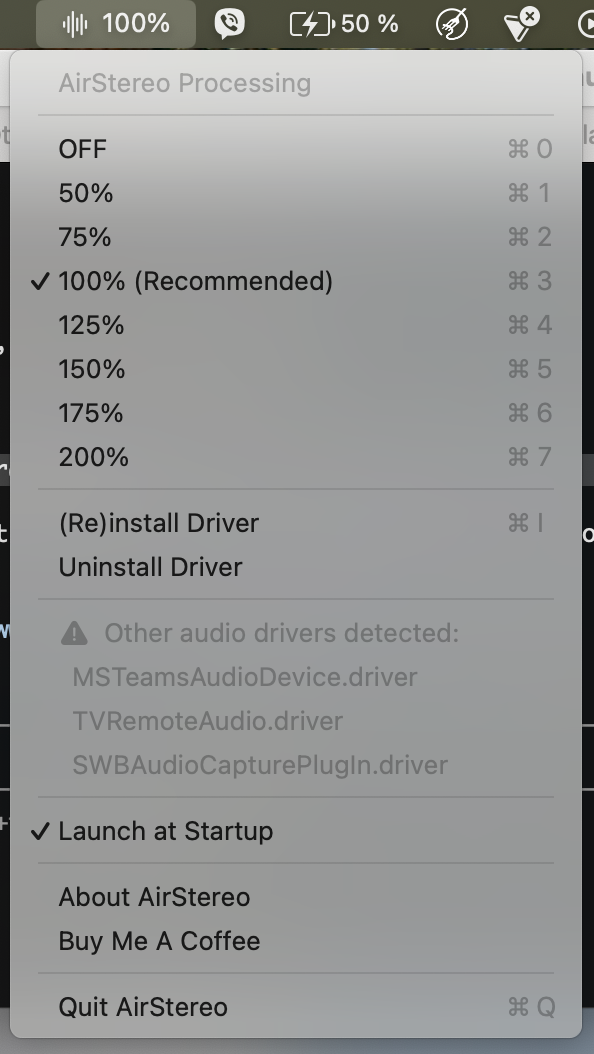
Stereo Widening
Mid-side processing expands the stereo image from 50% to 200%. Adjustable in real-time from the menu bar.
IIR Bass Boost
Two cascaded biquad low-shelf filters add up to +5.7 dB at 32 Hz, tapering naturally to +1.6 dB at 500 Hz.
Near-Zero Latency
64-frame buffer at 48 kHz = ~1.3 ms. Processing happens directly in the CoreAudio HAL driver.
System-Wide
Works with every app automatically. Music, YouTube, Spotify, games — everything sounds better.
Headphone Aware
Automatically disables processing when headphones are connected and restores your setting when unplugged.
Lightweight
Tiny menu bar app + driver-level processing. No background processes, no CPU overhead, no subscription.
Hear the Difference
Play this track at low volume on your MacBook Air speakers. Switch between OFF and 150% in the AirStereo menu to experience the full effect.
Technical Specs
Getting Started
Download & Open
Download AirStereo.app, unzip, and copy to /Applications. If macOS blocks it, run: xattr -cr /Applications/AirStereo.app
Install the Driver
Click (Re)install Driver in the menu bar. Enter your admin password when prompted.
Select AirStereo as Output
Open System Settings > Sound and choose AirStereo as your output device.
Enjoy
Adjust the processing level from the menu bar. We recommend 100% for everyday listening.
Why AirStereo Exists
A few years ago, I ordered a MacBook Air M2. I was excited — until I heard the speakers. Compared to my MacBook Air M1, they sounded flat, mono-ish, like a cheap kitchen radio. I returned it the next day.
Fast forward to 2026: both MacBook Air M4 and M5 have been released — same beautiful design, same incredible battery life, and still the same disappointing speaker sound. Narrow stereo image, no bass, no depth.
So I built AirStereo. A system-wide audio driver that does what Apple should have done from the start: widen the stereo image and add some warmth to the low end. No EQ app running in the background, no subscription, no bloatware — just a lightweight CoreAudio driver that makes your MacBook Air finally sound the way it should.
— Frank